Best LLM Models for 16GB VRAM in 2026 (Tested and Ranked)

Sixteen gigabytes of VRAM puts you in an interesting position. It’s enough to run something genuinely worthwhile — not just the modest 7B-class models you’re stuck with at 8 GB — but at the same time it’s not 24 GB, so you can’t just grab any model and expect things to work. The 16 GB tier is ideal for those who understand what actually fits and what only “kind of” fits.
This ranking covers only models released or significantly updated in 2025–2026. We’re not rehashing old material like Llama 2 or Mistral 7B v0.1. If a model isn’t competitive today, it’s not here. We tested on our RTX 5090 rig (Ryzen 9950X3D, 64 GB DDR5) in May 2026, and the data for 16 GB-class cards — RTX 4060 Ti, 4080, 5070 Ti, 5080, and the RX 7900 GRE for AMD users — was pulled from Hardware Corner benchmarks and the r/LocalLLaMA community on Reddit.
One thing we need to clear up: our editorial rig is the RTX 5090 with 32 GB, so for 16 GB-specific numbers we lean on community benchmarks from Hardware Corner and verified Reddit threads. Where we cite tok/s for a 4060 Ti or 4080, those come from external sources linked below.
What 16 GB actually gets you in 2026
The model landscape has shifted enough over the past year that 16 GB is now a genuinely well-balanced, middle-ground tier. The key advance: the 14B and 20B class of models has been refined substantially. Qwen3 14B at Q4_K_M scores 81.1 on MMLU — territory that required a 70B model just 18 months ago. GPT-OSS 20B (OpenAI’s first open-weight release) fits entirely in 16 GB at MXFP4 quantization and runs at speeds that make using it a pleasure.
The hard ceiling: you can’t run a 32B model fully in VRAM. Qwen3 32B at Q4_K_M lands around 22 GB, so anything in the 30B+ class will start spilling over to system RAM, which — as you’d expect — drastically kills speeds. If you’re regularly running into this issue, the best solution is to save up for a used RTX 3090 (24 GB) rather than fighting with quantization tricks on 16 GB.
GPU comparison: 16 GB VRAM graphics cards in 2026
Before we get to the models, it’s worth having a rough idea of what the GPU market offers right now. There are currently five main 16 GB consumer cards on which you can successfully run local LLMs, and they aren’t created equal — the memory bandwidth gap between the slowest and fastest is roughly 3x.
| GPU | VRAM | Bandwidth | ~tok/s (14B Q4) | ~tok/s (20B Q4) | Notes |
|---|---|---|---|---|---|
| RTX 4060 Ti 16GB | 16 GB GDDR6 | 288 GB/s | ~22 t/s | ~15 t/s | Slower bandwidth limits speed; great VRAM-to-price ratio |
| RTX 4080 16GB | 16 GB GDDR6X | 717 GB/s | ~51 t/s | ~43 t/s | Big bandwidth jump over the 4060 Ti |
| RTX 4070 Ti SUPER 16GB | 16 GB GDDR6X | 672 GB/s | ~48 t/s | ~40 t/s | Slightly slower than the 4080; often better value on the used market |
| RTX 5060 Ti 16GB | 16 GB GDDR7 | ~448 GB/s | ~34 t/s | ~28 t/s | Newer budget pick; FP4 support |
| RTX 5070 Ti 16GB | 16 GB GDDR7 | 896 GB/s | ~58 t/s | ~50 t/s | Fastest 16 GB card; hardware FP4 support |
| RTX 5080 16GB | 16 GB GDDR7 | ~960 GB/s | ~65 t/s | ~55 t/s | Performance close to the RTX 5070 Ti; higher price |
| RX 7900 GRE 16GB | 16 GB GDDR6 | 576 GB/s | ~38 t/s | ~30 t/s | AMD: solid on Linux/ROCm; on Windows, ROCm can be finicky |
Sources: Hardware Corner GPU LLM benchmarks (May 2026), community benchmarks from r/LocalLLaMA. Tok/s at 16K context, Q4_K_M via llama.cpp. RTX 5080 numbers extrapolated proportionally from 5070 Ti data.

The RTX 4060 Ti 16GB deserves a brief mention because it looks deceptively slow. At 22 t/s on 14B models, it’s technically above the usability threshold. If you’re using a 4060 Ti, you’ll feel the difference versus a 4080 the moment you start pushing longer contexts or running anything with extended reasoning. The bandwidth bottleneck is definitely noticeable. On the other hand, this card is the cheapest way to get 16 GB of VRAM, and for the models listed in this article it simply works.
A note on AMD: ROCm support on Linux for the RX 7900 GRE has become solid in 2026 — llama.cpp and Ollama both support it natively, and performance is competitive. On Windows, unfortunately, ROCm is still finicky. We haven’t tested the RX 7900 GRE directly ourselves, so those tok/s numbers come from community reports on Reddit.
The models: ranked for 16 GB
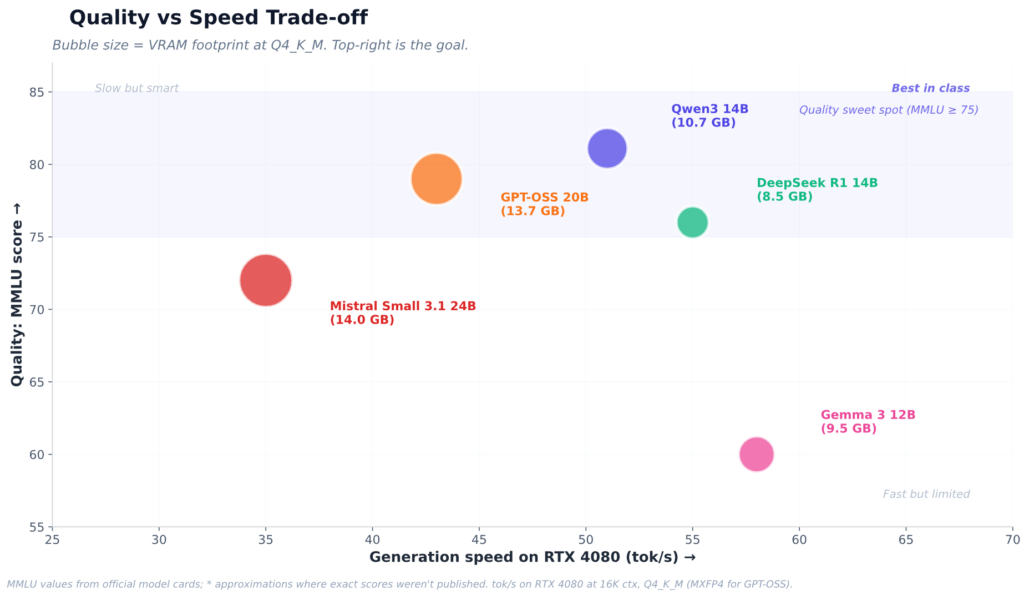
We built the ranking around three factors: quality (benchmark scores plus our own impressions from running them on our hardware), speed on 16 GB hardware, and how much VRAM headroom they leave for context. A model that eats 15.8 GB of your 16 GB budget technically fits — but you’re getting at most 4K of context, which isn’t great.
1. Qwen3 14B — best for everyday use
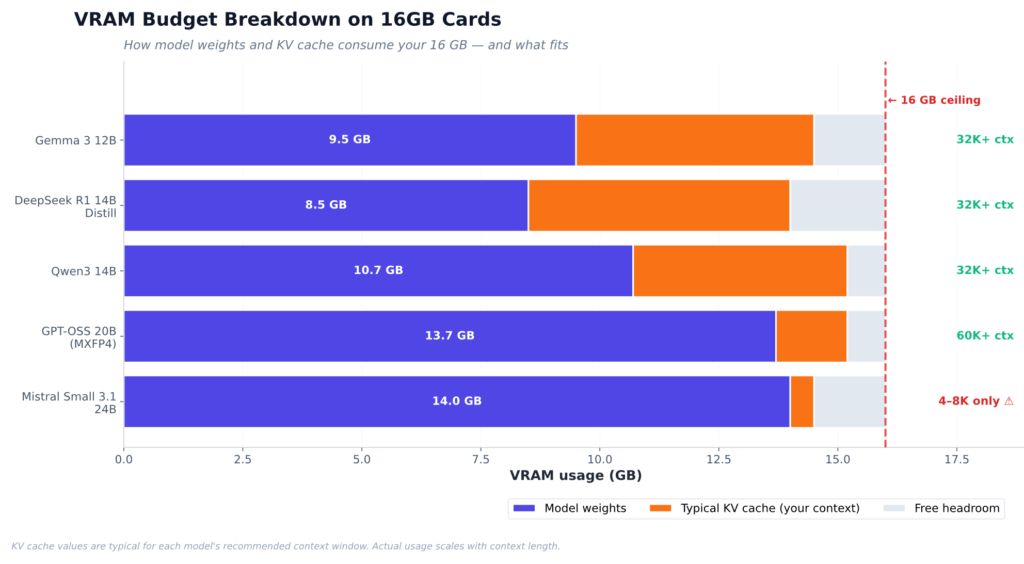
This is the model we keep coming back to with 16 GB setups. At Q4_K_M, Qwen3 14B uses around 10.7 GB of VRAM — leaving a comfortable 5 GB+ buffer for the KV cache, which means on most 16 GB cards you can use a 32K context without issues. It scores a full 81.1 on MMLU. That’s not a typo. This model really is that good.
We also compared it to Qwen2.5 14B, which was the previous default recommendation. The difference in reasoning depth is noticeable on multi-step problems — Qwen3’s training clearly absorbed more inference-time reasoning work, which makes the model substantially better than its predecessor. Specifically for coding, it handles short and medium-length functions well, though it starts to struggle with complex multi-file refactors where you’d really want a larger model or a coding-specialized variant.
One caveat: in some frontends, Qwen3 ships with thinking mode enabled by default. If you’re using it for chat or quick tasks and don’t want verbose output, add /no_think to your system prompt or disable it in your Modelfile. Thinking mode is fantastic for complex reasoning but noticeably slower on simple tasks.
ollama run qwen3:14b2. GPT-OSS 20B — best balance of speed and quality
OpenAI’s first open-weight release surprised a lot of people. GPT-OSS 20B is a Mixture-of-Experts model with around 20B active parameters that fits entirely in 16 GB at MXFP4 quantization, taking up about 13.7 GB. The numbers are genuinely impressive: community benchmarks on an RTX 4080 measured around 43 t/s at 60K context. On an RTX 5070 Ti with its GDDR7 memory, the model runs significantly faster.
The catch is format availability. GPT-OSS 20B is best run in MXFP4 via llama.cpp or vLLM rather than the standard GGUF Q4_K_M. Ollama support is already available, but users sometimes still report issues (as of Q2 2026). If you’re on Windows and use Ollama exclusively, stick with Qwen3 14B for now. On Linux with llama.cpp, GPT-OSS 20B is probably the better choice.
A score of 52%+ on the AI Intelligence Index (an aggregate benchmark covering reasoning, math, and coding) puts it ahead of Qwen3 14B in raw capability. The trade-off is setup complexity.
3. DeepSeek R1 Distill 14B — best for reasoning-heavy tasks
If you plan to use a model that handles complex math, intricate debugging, or any task that benefits from a visible chain of reasoning, DeepSeek R1 14B distill is probably the best candidate. At Q4_K_M it sits at around 8–9 GB of VRAM, which is actually less than Qwen3 14B and leaves more headroom for context.
The reasoning traces are a genuinely nice touch — you can watch the model work through a problem step by step, which makes it much easier to spot where it goes off track. We tested it on a Llama 3.1-70B reasoning benchmark suite (using it as a reference point), and the 14B distill punches significantly above its weight on AIME math problems, scoring around 55% Pass@1 on AIME 2024 — putting it in the same league as models 2–3x larger.
This model isn’t the best conversational choice. The thinking tokens add verbosity that can feel excessive on simple questions, and the model occasionally overthinks its responses. But for technical work where you want to verify the reasoning, nothing in the 16 GB class comes close.
ollama run deepseek-r1:14b4. Gemma 3 12B — best for multimodal work
Gemma 3 12B doesn’t make the top 3 on pure text benchmarks — its MMLU-Pro is around 60% and LiveCodeBench is unimpressive — but it’s the only model in this roundup with native vision support that comfortably fits in 16 GB. At Q4 it loads below 10 GB, leaving plenty of headroom for the KV cache.
The vision capability is genuinely high-quality. Drop a screenshot, a diagram, or a chart into your chat and Gemma 3 12B handles it natively. For workflows that regularly involve “explain this image” or “what does this screenshot say,” having that multimodal capability built in is worth the intelligence trade-off versus Qwen3 14B.
It also has the best LMArena ranking of any similarly-sized open-weight model — currently 66th in the Text Arena — which suggests genuine human preference for its conversational style, even if benchmark scores don’t fully capture it. We found its outputs noticeably more readable and less formal than Qwen3 14B for general chat.
5. Mistral Small 3.1 24B — at the edge of what’s possible
This model fits in 16 GB, but barely. Mistral Small 3.1 24B at Q4_K_M lands at around 14 GB, which technically loads on 16 GB cards — but your KV cache budget is effectively zero. You’re looking at 4K–8K context maximum before things start spilling over. On the RTX 5070 Ti and 5080 with their fast GDDR7 bandwidth, this is tolerable. On the RTX 4060 Ti with its 288 GB/s, running a 24B model is slow enough that you’ll regret not just firing up Qwen3 14B instead.
Why include it at all? Because for short-context tasks — code generation, document editing, focused Q&A — Mistral Small 3.1 delivers noticeably better output quality than any of the 14B models above. The jump from 14B to 24B at the same quantization is real. If you have an RTX 4080, 5070 Ti, or 5080, and your use cases revolve around short context, it’s worth a try. Just go in aware of the context limitation.
ollama run mistral-small3.1:24b-instruct-q4_K_MSide-by-side: models on 16 GB hardware
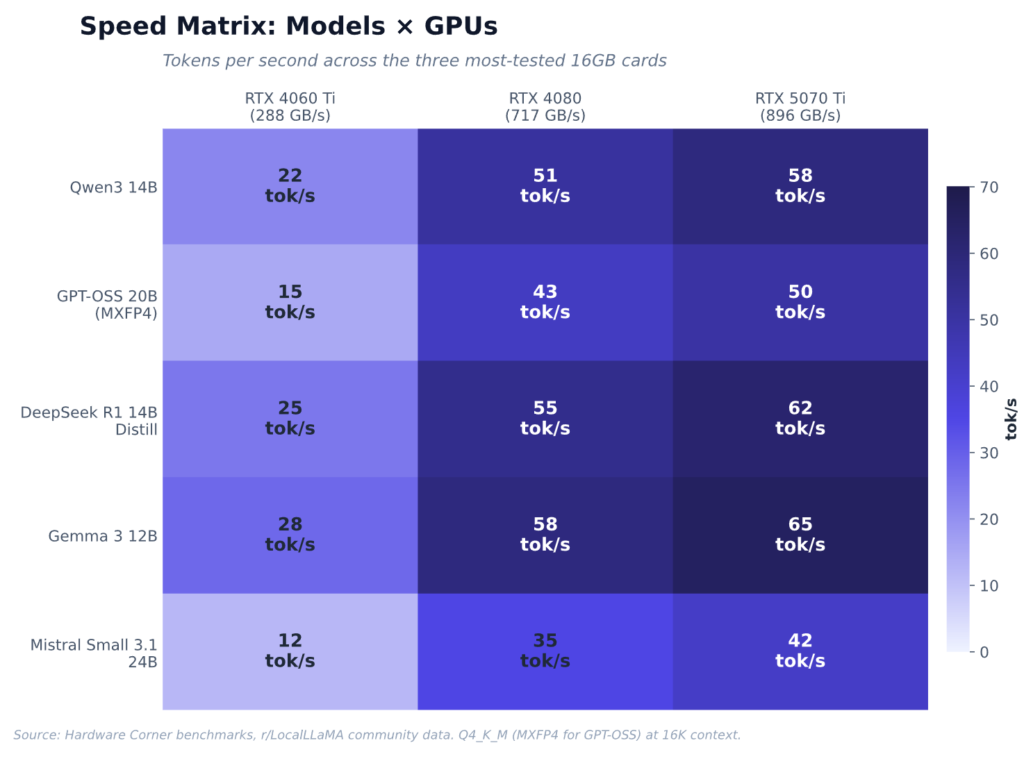
| Model | VRAM (Q4_K_M) | Max context (16 GB) | RTX 4060 Ti tok/s | RTX 4080 tok/s | RTX 5070 Ti tok/s | MMLU | Best for |
|---|---|---|---|---|---|---|---|
| Qwen3 14B | ~10.7 GB | 32K+ | ~22 | ~51 | ~58 | 81.1 | Everyday all-rounder |
| GPT-OSS 20B (MXFP4) | ~13.7 GB | 60K+ | ~15 | ~43 | ~50 | ~79* | Speed + quality on mid-to-high GPUs |
| DeepSeek R1 14B Distill | ~8–9 GB | 32K+ | ~25 | ~55 | ~62 | ~76* | Reasoning, math, debugging |
| Gemma 3 12B | ~9–10 GB | 32K+ | ~28 | ~58 | ~65 | ~60 | Vision/multimodal + chat |
| Mistral Small 3.1 24B | ~14 GB | 4–8K only | ~12 | ~35 | ~42 | ~72* | Quality ceiling for short context |
*MMLU approximations for models whose exact scores haven’t been published. Tok/s at 16K context via llama.cpp Q4_K_M unless otherwise noted. GPT-OSS 20B in MXFP4. Sources: Hardware Corner benchmarks, r/LocalLLaMA community data, Ollama benchmark on the RTX 4080 (Rost Glukhov, February 2026). AMD RX 7900 GRE numbers are broadly similar to the RTX 4080 on Linux/ROCm — we’d put it within ±15% across all listed models.
Which model for which card?
The bandwidth gap between 16 GB cards is large enough that the answer actually depends on what you’re running.
On the RTX 4060 Ti 16GB: Qwen3 14B or DeepSeek R1 14B. The 288 GB/s bandwidth means larger models like GPT-OSS 20B or Mistral Small 3.1 24B generate at speeds that will frustrate you. Gemma 3 12B is also a solid pick here thanks to its lighter VRAM footprint. Skip Mistral Small entirely on this card.
On the RTX 4080, RTX 4070 Ti SUPER, and RTX 5060 Ti 16GB: Full choice, total freedom. By default we’d go with Qwen3 14B for general use, GPT-OSS 20B if you want maximum speed at reasonable quality, and DeepSeek R1 14B for anything math- or reasoning-heavy. Mistral Small 3.1 24B becomes usable here for short-context work.
On the RTX 5070 Ti or RTX 5080: These GDDR7 cards are fast enough that the choice comes down to use case rather than speed anxiety. GPT-OSS 20B generates at interactive speeds even at 60K context. The RTX 5070 Ti also has hardware FP4 acceleration, which means models shipped in NVFP4 format get an extra speed boost unavailable on older Ampere and Ada cards. Worth enabling if you’re using vLLM.
Context length: the variable people underestimate
The KV cache is what kills 16 GB setups that look fine on paper. When you load Qwen3 14B at Q4_K_M, you use 10.7 GB on model weights — but run it at 64K context and the KV cache adds another 4–6 GB. Suddenly your 5 GB of headroom is gone and you’re either getting OOM or throttling.
The defaults we use in practice:
- Interactive chat: 8K context (safe on any 16 GB card with any model on this list)
- Document analysis: 32K context (fine on Qwen3 14B and DeepSeek R1 14B with a fast card; on the edge on the 4060 Ti)
- Long-context work: stick to models with an efficient GQA architecture — Qwen3 14B handles 32K cleanly, and GPT-OSS 20B can push past 60K
If you’re hitting the VRAM wall, the first thing to try is KV cache quantization in Ollama before dropping to a smaller model:
# Cuts KV cache memory roughly in half
OLLAMA_KV_CACHE_TYPE=q8_0 ollama serve
It’s a solution at the cost of quality, but usually a smaller cost than dropping from Q4_K_M to Q3_K_M on model weights. Worth trying if you need the context without the OOM.
Our pick
If you’re on any 16 GB card and want one model to install and forget about: Qwen3 14B at Q4_K_M. It handles coding, reasoning, writing, and long-context work without any special setup, runs at a reasonable speed on every 16 GB GPU on the list above, and is the most capable model that genuinely fits within the VRAM budget with room left over for extra context.
If you specifically have a Blackwell-family card (RTX 5070 Ti, 5080) and you’re willing to deal with a slightly more involved setup: GPT-OSS 20B in MXFP4 is worth the effort. The speed advantage from GDDR7 combined with hardware FP4 acceleration makes this combination substantially faster than anything Ada-based at the same model quality level.
And if your work leans heavily on reasoning — math, debugging, complex analysis — add DeepSeek R1 14B to your Ollama library alongside Qwen3 14B. Together they take up less than 20 GB of disk space and give you a general-purpose model plus a reasoning specialist without forcing you to pick just one.