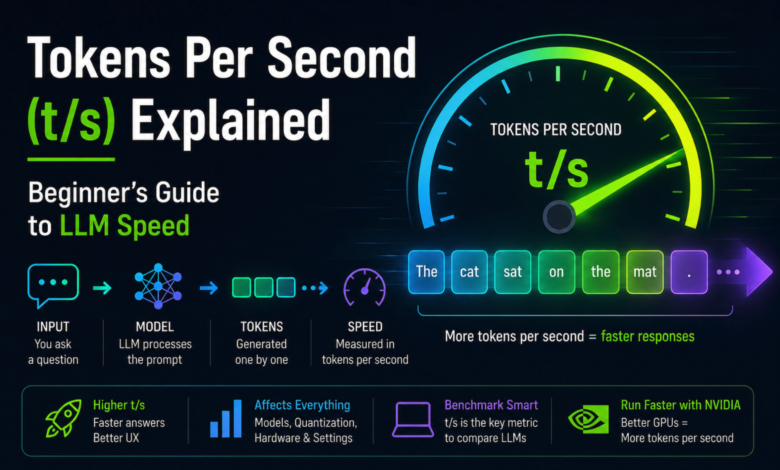
Tokens Per Second (t/s) Explained: Beginner’s Guide to LLM Speed
You’ve watched it happen. You type a question into ChatGPT or your local LLM, hit enter, and the answer starts appearing on screen – sometimes a smooth river of text, sometimes a stuttering drip, sometimes an instant wall that’s done before you can blink. That visible speed is what people are talking about when they say “tokens per second.” It’s the headline metric of running a language model, and it’s the number that determines whether using an AI feels like a conversation or feels like waiting for a fax to arrive.
The trouble is, “tokens per second” isn’t really one number. It’s at least three numbers that everyone calls by the same name, and the gaps between them are often where confusion creeps in. A beginner reading “the RTX 5090 hits 200 tokens per second on Llama 8B” walks away with one impression. The reality of what that figure means – and whether it’s what they should care about – is more nuanced.
This piece walks through what tokens per second actually measures, why the same model on the same hardware can produce wildly different t/s numbers, and – maybe more usefully – what speeds humans actually need before chasing more becomes pointless. By the end you’ll be able to look at a benchmark, predict roughly what your own setup will deliver, and decide whether the upgrade you’re eyeing will move the needle for your real use case.
What’s a token, before we count them per second
A token isn’t a word, and the difference matters once we start dividing by seconds.
When a language model reads or writes text, it doesn’t see characters or whole words. It sees tokens – fragments produced by a tokenizer, which is a piece of code that splits text into chunks the model can process. Some tokens are entire common words (“the”, “and”, “computer”). Some are word fragments (“ation”, “pre”, “tion”). Some are single characters or punctuation marks. Tokenizers are built so that frequent patterns get their own token and rarer combinations get split apart.
The widely-cited rule of thumb for English is that one token equals roughly 0.75 words, which works out to about 1.3 tokens per word in the other direction. So a 1,000-word email is roughly 1,300 tokens. A 100-word paragraph is roughly 130 tokens. The ratio shifts for other languages – Polish, Mandarin, and Arabic typically use more tokens per equivalent meaning, which is one reason non-English work feels slower on the same model.
Once a model is generating text, it produces these tokens one at a time, in order. Each token requires a full pass through the model – billions of multiplications across billions of parameters, just to predict what should come next. Tokens per second is the rate at which the model finishes that work and emits the next piece of text. It’s not how fast the GPU runs in some abstract sense. It’s the actual rate at which finished words land on your screen.
Why “tokens per second” is at least three different numbers
Here’s where most beginner guides go wrong by simplifying too aggressively. When someone says “this model runs at 100 tokens per second,” they could mean any of three things, and the gaps between them are sometimes huge.
Generation speed is the rate at which a model produces output tokens after it’s started writing. This is usually what people mean colloquially. If you ask a model to write a 500-word essay and it streams that essay onto your screen at 100 tokens per second, that’s generation speed. This is the number that determines how long you wait for an answer once it starts appearing.
Prompt processing speed is the rate at which a model reads your input before it generates anything. If you paste a 50,000-word document and ask the model a question about it, the model has to “read” all 50,000 words first – that’s the prompt processing phase. Modern hardware processes prompt tokens far faster than it generates new ones, sometimes by a factor of 50 to 100. On an RTX 5090 running an 8B model, prompt processing might run at 5,000+ tokens per second while generation hovers around 150-200. Same hardware, same model, two very different numbers.
Time To First Token (TTFT) is sort of the inverse measurement: instead of a rate, it’s a delay. It’s how long you wait between hitting “send” and seeing the first piece of output appear. TTFT is mostly determined by how long prompt processing takes, plus model loading and routing overhead in cloud APIs. Artificial Analysis measured Claude Opus 4.7’s max-effort TTFT at 19 seconds in early 2026 – that’s the model “thinking” before any output appears. Once it starts, the generation rate is around 45 t/s, but you’ve already waited nearly half a minute. The composite experience is dominated by that wait, not by the steady-state speed.
The reason this distinction matters is practical. Two setups can have identical generation speeds and feel completely different to use. A local model with 0.2-second TTFT and 80 t/s generation feels snappy, even alive. A cloud model with 4-second TTFT and 80 t/s generation feels sluggish for short questions, even though the throughput is identical. Conversely, a model with low TTFT but slow generation can feel responsive at first and then frustrating once it’s clear how slowly the response is unfolding.
So when you read a benchmark headline, the first question is which of these three numbers is being reported, and whether the others matter for your use case. For interactive chat, TTFT and generation speed both matter and roughly equally. For agentic workflows that ingest huge documents, prompt processing speed dominates everything else. For long-form generation tasks like writing a novel chapter, only generation speed matters and you’ll wait through whatever TTFT the system has.
The math is simpler than you’d think
One of the great open secrets of local LLM inference is that you can predict your generation speed pretty accurately, on almost any hardware, with a single division. The number you need is your GPU’s memory bandwidth.
Here’s why. When a language model generates a single token, the GPU has to read the entire model from VRAM to compute that prediction. Not parts of the model – the whole thing, every parameter, every layer. The compute itself is fast; the bottleneck is how quickly the data can flow from memory into the cores that operate on it. This is why people call modern LLM inference “bandwidth-bound” rather than “compute-bound.” On most consumer cards the math cores are bored most of the time, waiting for weights to arrive.
Which leads to a simple ceiling formula. Take your GPU’s memory bandwidth in gigabytes per second, divide by the size of your model on disk in gigabytes, and you get a rough upper bound on the tokens-per-second the card can theoretically deliver.
An example using our test rig. The RTX 5090 has 1,792 GB/s of memory bandwidth. A typical 8-billion-parameter model at 4-bit quantization is roughly 5 GB on disk. Divide: 1,792 ÷ 5 = ~358 t/s as the theoretical ceiling. Real-world performance lands somewhere between 50% and 75% of that ceiling depending on the kernels, framework overhead, and how clean your software stack is. Our actual measurements on Qwen3-8B at Q4_K_M land around 165 t/s, which is about 46% of the ceiling – typical for GGUF on llama.cpp. EXL2 with hand-tuned kernels gets closer, around 205 t/s, or 57% of ceiling. The pattern is consistent across cards.
Run the same exercise on an RTX 4090, which has 1,008 GB/s. Same 5 GB model: 1,008 ÷ 5 = ~201 t/s ceiling, expect 90-115 t/s actual. RTX 3090 with 936 GB/s: ~187 t/s ceiling, expect 80-100 t/s actual. RTX 5070 Ti with 896 GB/s: ~179 t/s ceiling, expect 75-95 t/s actual. Apple M3 Ultra with 819 GB/s: ~164 t/s ceiling, expect 60-80 t/s actual due to weaker kernels.
This rule of thumb falls apart in two specific cases. The first is Mixture of Experts (MoE) models, where only a fraction of parameters fire on each token. A 30B-parameter MoE model with 3B active per token reads only ~2 GB of weights instead of ~18 GB, so the bandwidth math gives you a much higher ceiling. This is why MoE architectures feel so fast on consumer cards – the math says they should. The second is when the model doesn’t fit entirely in VRAM. The moment you start swapping layers between GPU and system RAM over PCIe, your effective bandwidth crashes from “GPU memory bus” speed to “PCIe Gen 5” speed, which is roughly 30 to 100 times slower depending on the card. The math no longer applies; you’ve changed bottlenecks.
Internalize this and you stop thinking about LLM inference in terms of CUDA cores or “AI TOPS.” You start thinking about GB/s, and you’re correct most of the time. It’s also why the jump from 24 GB cards to 32 GB cards matters more than the spec sheet suggests – not just because larger models fit, but because they fit without spilling and the bandwidth math holds.
What speeds do humans actually want?
This is the question almost no benchmark addresses, and probably the most useful one for a beginner. There’s a finite range of speeds that meaningfully improve your experience. Past that, more is wasted on you.
Average silent reading runs around 250 words per minute for adults – slower for technical content, faster for fiction. At our 1.3-tokens-per-word ratio, that’s about 5.4 tokens per second. So if a model generates output at exactly 5 t/s, you’re reading it as it’s being written, with no spare moment to look ahead. This is the floor where the experience stops feeling broken – anything slower and you sit waiting for the next word.
The next threshold is around 10-12 t/s, which corresponds to a comfortable 450-500 words-per-minute reading pace. At this speed the text appears slightly faster than you can read it carefully, which is the sweet spot for most chat use – you have a moment to skim, to think, to absorb. Most users describe this range as feeling “natural.” It doesn’t feel slow, doesn’t feel rushed, and you barely notice the streaming itself.
Around 25-30 t/s the perception flips. The text now appears faster than any human can read with comprehension. You’ve stopped reading along and started waiting for the model to finish so you can read the whole thing at your own pace. At this speed you don’t perceive streaming at all – output just appears, in chunks, like a remote API has just delivered the answer in pieces. This is roughly where Claude and many cloud APIs land in production.
Above 50 t/s the model effectively appears to teleport responses onto your screen for any short answer. A 200-token reply (~150 words) finishes in 4 seconds. A 500-token reply finishes in 10. Above 100 t/s most short responses are done before you’ve finished reading the prompt back. There’s still real value here – for long generations, for agentic loops where the model is making dozens of tool calls invisibly, for batch document processing – but the marginal value for human-in-the-loop chat has flattened to nearly zero.
| Speed | Feels like | Maps to |
|---|---|---|
| ~5 t/s | Reading along, no spare moment | Floor of acceptable |
| ~10 t/s | Comfortable, natural pace | Sweet spot for chat |
| ~25 t/s | Faster than you can read | Cloud-API-typical |
| ~50 t/s | Short answers feel instant | Premium local setup |
| ~150+ t/s | Imperceptible streaming | Useful only for batch / agents |
The practical implication is that for an interactive chatbot use case, anything above 30-40 t/s is mostly bragging rights. Pushing from 80 t/s to 200 t/s by upgrading from a 4090 to a 5090 makes negligible difference for “how does it feel to chat with this.” The places it matters are real, but specific: agentic workflows where the model is silently chewing through dozens of internal turns; document processing on tens of thousands of tokens; multi-user serving where throughput compounds across requests; long-form code generation where a 4,000-token output at 80 t/s takes 50 seconds versus 25 seconds at 160 t/s.
This framing changes the upgrade conversation. If you’re chatting with a local model and you’re getting 60 t/s, the question isn’t “how do I get to 150.” It’s “what would I do with that I’m not doing now.”
How to measure your own t/s
The good news: most modern inference tools display your t/s automatically. The slightly less good news is that they often display it without making it clear which of the three speeds we discussed they’re measuring.
If you’re using Ollama, run any prompt and then look at the verbose output – passing --verbose or using /show in the chat will print eval rate (token generation speed) and prompt eval rate (prompt processing speed) at the end of every response. The first number is what you’d quote when comparing to a benchmark.
If you’re using LM Studio, the speed is shown in real time in the chat interface, just below each generated response. It tracks generation speed by default. Open the developer panel for prompt processing.
For llama.cpp directly, the canonical tool is llama-bench, which runs standardized prompt processing and generation tests on a model and prints both numbers cleanly. Run it like this:
./llama-bench -m /path/to/your/model.gguf -p 1024 -n 256 -ngl 99 -fa 1The -p 1024 flag tests prompt processing on a 1,024-token input. The -n 256 tests generation of 256 new tokens. The -ngl 99 offloads all layers to GPU. The output gives you both numbers in tokens per second, plus the timing it took. This is the same tool we use for our own benchmark posts, and the results are directly comparable to most published numbers from the local-LLM community.
One thing to watch out for when interpreting your own measurements: the first run of any model is usually slower than subsequent runs because of initial CUDA kernel compilation, file caching, and warm-up effects. Always run twice and trust the second number. We’ve covered the broader benchmarking methodology in our RTX 5090 performance guide if you want to dig into the more careful version.
Why your local 80 t/s isn’t the cloud’s 80 t/s
One of the more confusing comparisons people try to make is between their local setup and cloud APIs. “GPT-5.5 outputs at 65 tokens per second, my 5090 does 200 t/s on Llama 8B, so my home rig is faster.” The numbers are correct. The interpretation isn’t.
Cloud APIs almost always serve thousands of users simultaneously through a technique called continuous batching. Multiple users’ requests are bundled together and processed through the model in shared passes. Per-user generation speed gets capped intentionally – both because it has to share the GPU with other users, and because the system optimizes for total throughput across all of them, not single-user wall clock. Artificial Analysis’s data from May 2026 shows GPT-5.5 at around 65 t/s, Claude Opus 4.7 at 45 t/s, Gemini 3.1 Pro at 126 t/s, and gpt-oss-120B at 230 t/s. These are per-user speeds in production. The aggregate throughput across all users is higher by orders of magnitude.
So when your 5090 hits 200 t/s on an 8B model and a cloud API serves you GPT-5.5 at 65 t/s, the comparison isn’t “my hardware is 3x faster than OpenAI’s.” It’s “I’m getting all of the bandwidth of one 5090, and an OpenAI subscriber is getting one slice of a B200 that’s also serving thirty other people.” The cloud model is also vastly larger and more capable. If you locally hosted a model in GPT-5.5’s class – which you can’t on a 32 GB card, but as a thought experiment – your speed would crash spectacularly.
The other reason cloud comparisons mislead is reasoning models. When Opus 4.7 reports a 19-second TTFT in maximum-reasoning mode, it’s not “slow” in the bandwidth sense – it’s literally generating thousands of internal reasoning tokens before producing its first user-visible token. Your local model can’t do that not because it’s faster but because it doesn’t have the same reasoning architecture. Comparing raw t/s between a reasoning model and a non-reasoning model is a category error: they’re solving different problems with different shapes of compute.
The honest framing is that local and cloud each have their own t/s ranges, and they trade off different things. Local: lower TTFT, higher per-user generation rate, smaller and less capable models. Cloud: higher TTFT, lower per-user rate, vastly more capable models. Neither is “better” in t/s terms; they’re optimizing for different parts of the same problem.
The takeaways, in one place
For anyone who skipped the middle and wants the synthesis at the end:
Tokens per second isn’t one number – it’s at least three. Generation speed is what you usually mean. Prompt processing speed determines how fast big inputs get read. Time to First Token determines how snappy short interactions feel. The three are loosely related but not interchangeable, and which one matters depends on what you’re using the model for.
Predicting your speed is mostly a memory bandwidth problem. Take your GPU’s GB/s figure, divide by your quantized model’s size in GB, expect to land at 50-75% of that ceiling in practice. This works for any consumer card, any reasonable model, anywhere your model fits entirely in VRAM. Stop comparing CUDA core counts; start reading the bandwidth number.
Most useful speeds for human-in-the-loop chat are in the 10-50 t/s range. Below 5 t/s feels broken. Above 50 t/s is mostly invisible to a human reader. Past 100 t/s the value is in batch processing, agentic loops, or multi-user serving – not in chat experience.
And cloud t/s isn’t local t/s. Cloud APIs serve many users from one GPU, so per-user rates look modest while aggregate throughput is huge. Your local 200 t/s on an 8B model and the cloud’s 65 t/s on a frontier model are answers to genuinely different questions.
One last frame, which we think is the right one to leave you with. The reason to care about t/s isn’t to win a number on a benchmark. It’s to figure out whether the model you have is fast enough for the work you actually want to do. For a lot of beginners, the answer is yes – and the next upgrade isn’t a faster card, it’s a smarter way to use the speed they already have.
By [Author Name] – quantized.fyi editorial · May 2026